
Deploying a Databricks Workspace with PSC on GCP
A step-by-step guide to deploying a Databricks workspace with Private Service Connect (PSC) on GCP and common pitfalls to avoid.
gcp
cloud
security
When a Databricks cluster starts in a GCP project, the compute plane VMs need to talk to the Databricks control plane for two things:
Scope Note: This post focuses on classic clusters - where compute runs inside a GCP project and VPC. Serverless clusters run in Databricks-managed infrastructure and follow a different network model; PSC configuration for serverless is outside the scope of this guide.
In a standard deployment, cluster communication to the control plane is routed via public service endpoints. Although the VMs themselves do not have public IPs (SCC is enabled by default on GCP), traffic still exits the VPC through public routing rather than private connectivity. Databricks creates clusters without public IPs by default on GCP - refer to the private workspace definition in the (terminology) table.
For many organizations, this default behavior can be a concern. Enterprises with strong security and compliance requirements, especially those in healthcare or finance, often require that sensitive workloads avoid public internet paths entirely even when traffic is encrypted. Public routing also means control plane communication may rely on broader firewall exposure, and increases the risk of unintended exposure if a misconfiguration occurs. Additionally, compliance frameworks like HIPAA, SOC 2, and PCI-DSS increasingly expect network-level isolation as a baseline requirement, not just encryption in transit.
Private Service Connect (PSC) changes this model. Instead of routing to public service endpoints, PSC endpoints are created within the customer VPC and cluster traffic is directed through these endpoints. Traffic remains on Google's private backbone network, eliminating dependency on public routing paths.
This is where the value lies: control plane traffic remains private and reduces external exposure risk. Implementing PSC requires alignment across multiple infrastructure layers (frequently owned by different teams) with interdependent provisioning steps. The following walkthrough describes how the Rearc team brought this architecture into production.
A typical PSC architecture is shown in the diagram below. On the left is the customer-managed VPC, segmented into two subnets: a compute subnet (hosting Databricks cluster VMs) and a dedicated PSC endpoint subnet.
Cluster outbound traffic to the control plane resolves through a private Cloud DNS zone and is directed to the appropriate PSC endpoints. These endpoints connect to Databricks-published service attachments, allowing traffic to flow privately over Google's backbone network to the Databricks control plane shown on the right.
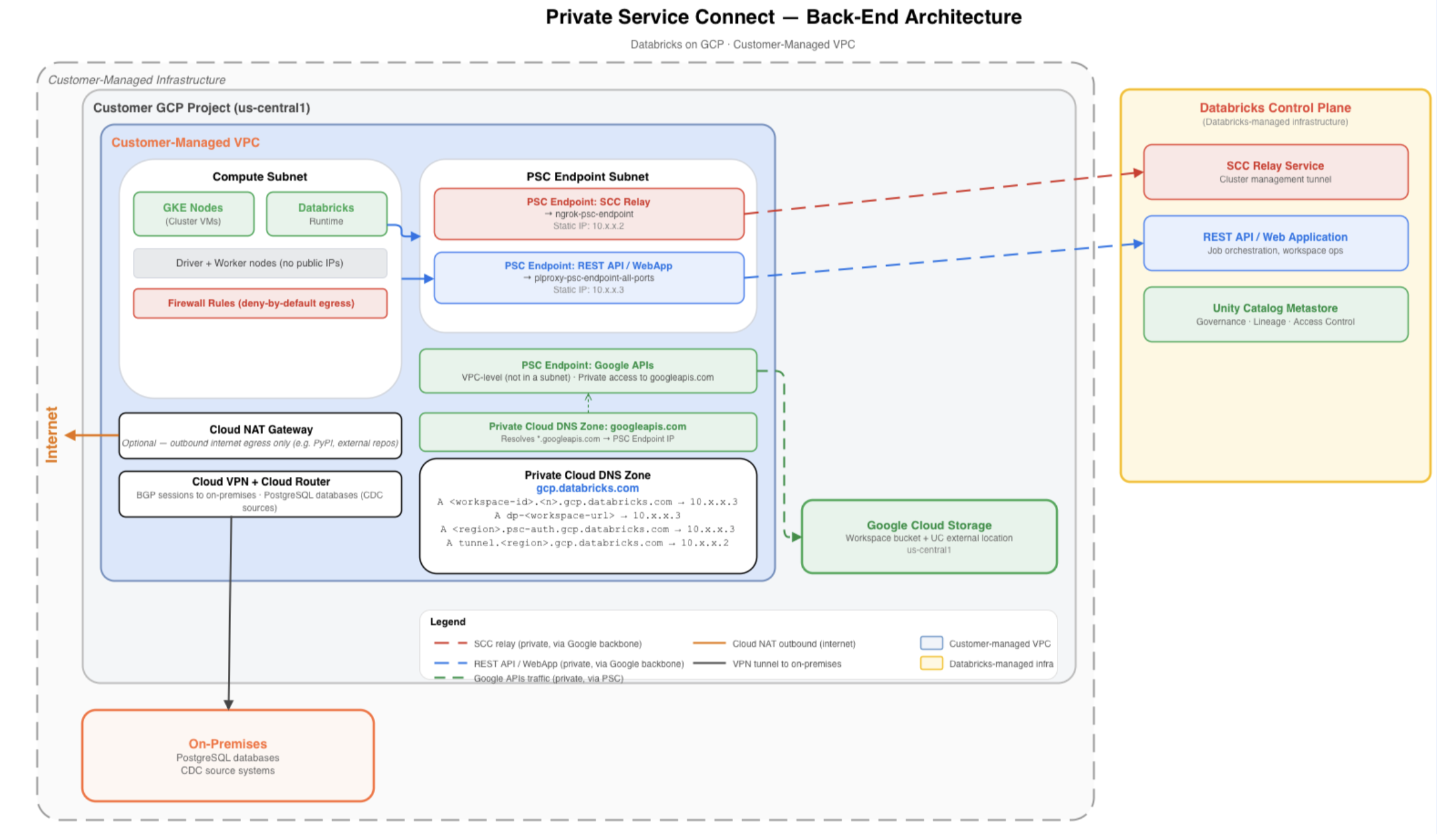
The VPC also includes Cloud NAT to handle approved outbound internet traffic, Cloud VPN with BGP sessions for hybrid connectivity to on-premises systems, and a deny-by-default firewall posture that permits only explicitly required communication paths.
Everything starts with the network.
Prerequisite: Provision a customer-managed VPC in the same region as the Databricks workspace. PSC requires a customer-managed VPC and must be configured at workspace creation time. It cannot be added later or enabled on a Databricks-managed VPC.
Create two subnets (official docs: Create a Subnet - Step 1):
googleapis.com private DNS zone to function correctly and must be in place before any clusters are launched.
See Private Google Access.None.
Private Google Access is not required on this subnet.Things to keep in mind for this step:
A natural question here: why is NAT needed if everything is made private? The answer is that PSC only covers the Databricks control plane connectivity. Certain operations still require outbound internet access. Cloud NAT is not required by PSC itself, but is required for specific operations like access to sample Unity Catalog datasets, and any other internet-dependent dependencies workloads rely on.
The Cloud Router should be created first since both the NAT gateway and VPN BGP sessions attach to it and rely on it for configuration.
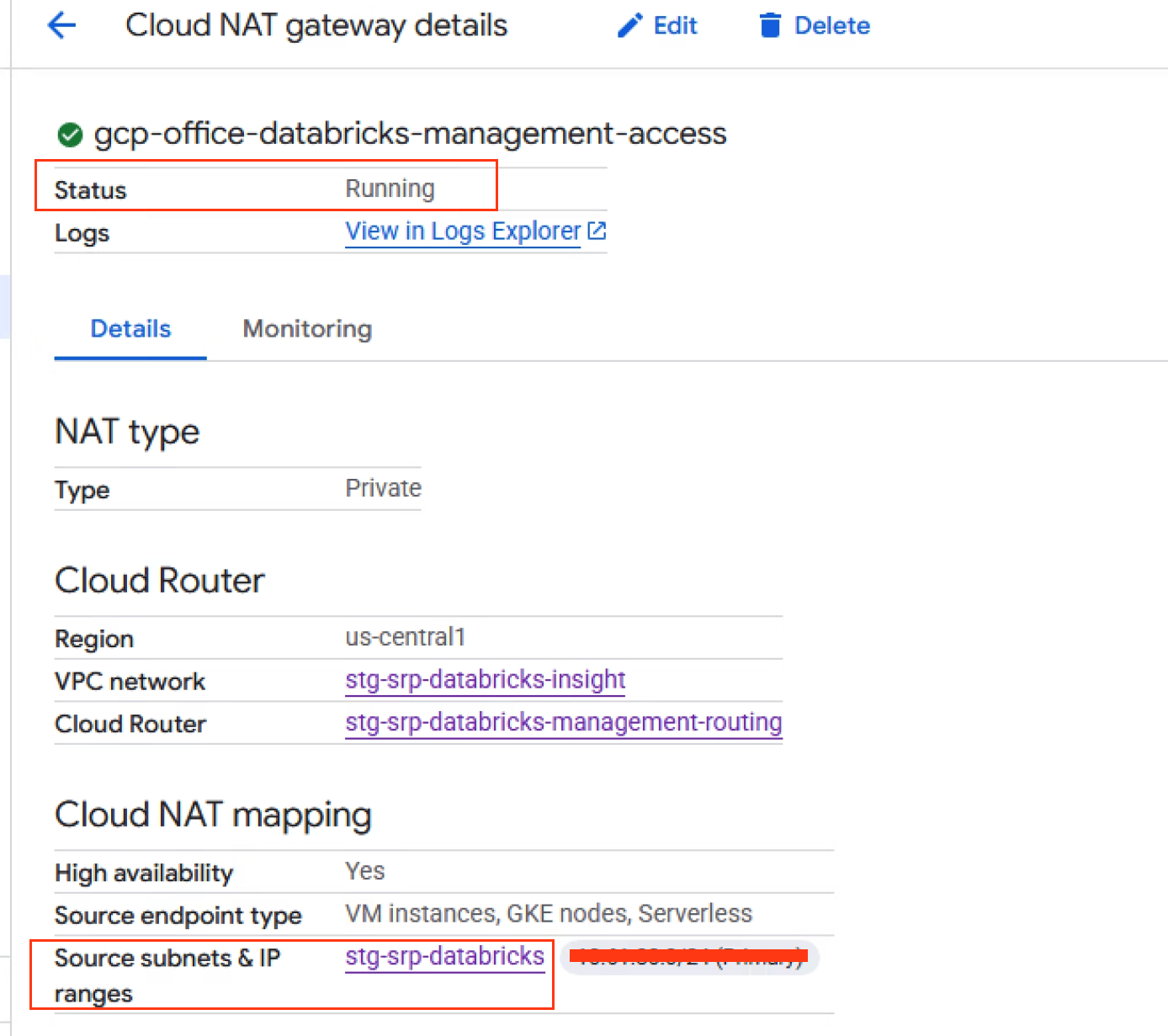
With the Cloud Router in place, attach a Cloud NAT gateway for the compute subnet. This allows outbound internet access without assigning public IPs to cluster VMs. For environments requiring stricter egress controls, a firewall-based egress architecture can be layered on top, but Cloud NAT provides a clean baseline.
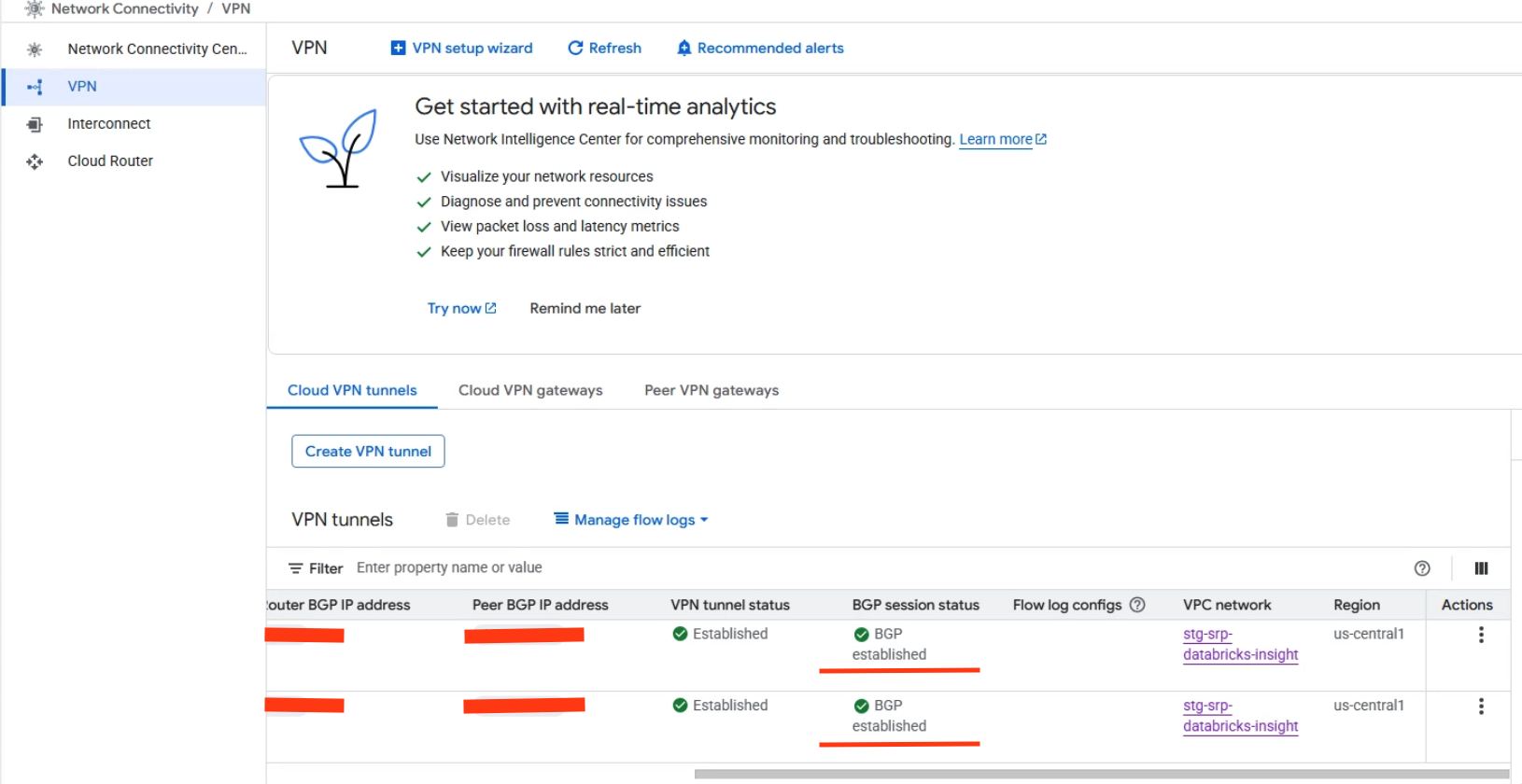
For hybrid connectivity (private communication between cloud-based Databricks clusters and on-premises source systems), a Cloud VPN with BGP Sessions was established to reach on-premises PostgreSQL databases. The VPN tunnels and BGP sessions need to be attached to the same Cloud Router in the same region as the VPC.
This is the core of the PSC setup. Databricks on GCP requires two separate endpoints, each connecting to a different service attachment.
The service attachment URIs are region-specific.
The exact URIs for any region can be found in the Databricks IP and domain reference.
For us-central-1, they look like this:
| Endpoint | Service Attachment Suffix |
|---|---|
| SCC Relay | projects/prod-gcp-us-central1/regions/us-central1/serviceAttachments/ngrok-psc-endpoint |
| Rest API/WebApp | projects/gcp-prod-general/regions/us-central1/serviceAttachments/plproxy-psc-endpoint-all-ports |
To provision each endpoint in the GCP Console:
NOTE:
gcloudCLI can be used as an alternative for this step. The GCP Console steps are shown in this article.
The static IPs are important. They become the DNS resolution targets and must not change for the lifetime of the workspace. If an IP changes after DNS records are configured, clusters will fail.
PSC does not replace firewall design. When running a deny-by-default egress model (and every PSC deployment should be), traffic from the compute subnet must be explicitly allowed to:
If the PSC egress rule is missing, DNS will resolve correctly and endpoints will appear healthy — clusters may provision, but they will fail to connect to the control plane if traffic cannot reach the PSC endpoints.
PSC Egress Rule
An explicit egress rule is required from the compute subnet to the PSC endpoint subnet:
gcloud compute firewall-rules create egress-to-databricks-psc-subnet \
  --direction EGRESS \
  --priority 1000 \
  --network <vpc-name> \
  --allow tcp:443,tcp:8443-8451 \
  --destination-ranges <psc-subnet-cidr>
This allows cluster nodes to reach both the endpoints.
In addition to the PSC-specific rule, firewall policies must explicitly allow required service paths — including database connectivity, cluster management traffic (SSH/HTTPS as needed), hybrid connectivity to on-premises networks over VPN, and approved outbound internet access via Cloud NAT. Databricks publishes a full firewall configuration guide.
The Databricks workspace needs a GCP service account with a specific set of permissions. A dedicated service account needs to be created and assigned a custom IAM role scoped to the minimum required:
gcloud iam roles create DatabricksWorkspaceRole \
  --project=<project-id> \
  --title="Databricks Workspace Role" \
  --description="Minimum permissions for Databricks workspace operations" \
  --permissions=\
iam.roles.create,iam.roles.delete,iam.roles.get,iam.roles.update,\
iam.serviceAccounts.getIamPolicy,iam.serviceAccounts.setIamPolicy,\
resourcemanager.projects.get,resourcemanager.projects.getIamPolicy,\
resourcemanager.projects.setIamPolicy,\
serviceusage.services.get,serviceusage.services.list,\
serviceusage.services.enable,\
compute.projects.get,compute.networks.get,\
compute.networks.updatePolicy,\
compute.subnetworks.get,compute.subnetworks.getIamPolicy,\
compute.subnetworks.setIamPolicy,\
compute.firewalls.get,compute.firewalls.create,\
compute.forwardingRules.get,compute.forwardingRules.list,\
cloudkms.cryptoKeys.getIamPolicy,cloudkms.cryptoKeys.setIamPolicy
With all GCP-side resources provisioned, the final step is to wire everything together in the Databricks account console.
Register VPC Endpoints:
Create a Network Configuration:
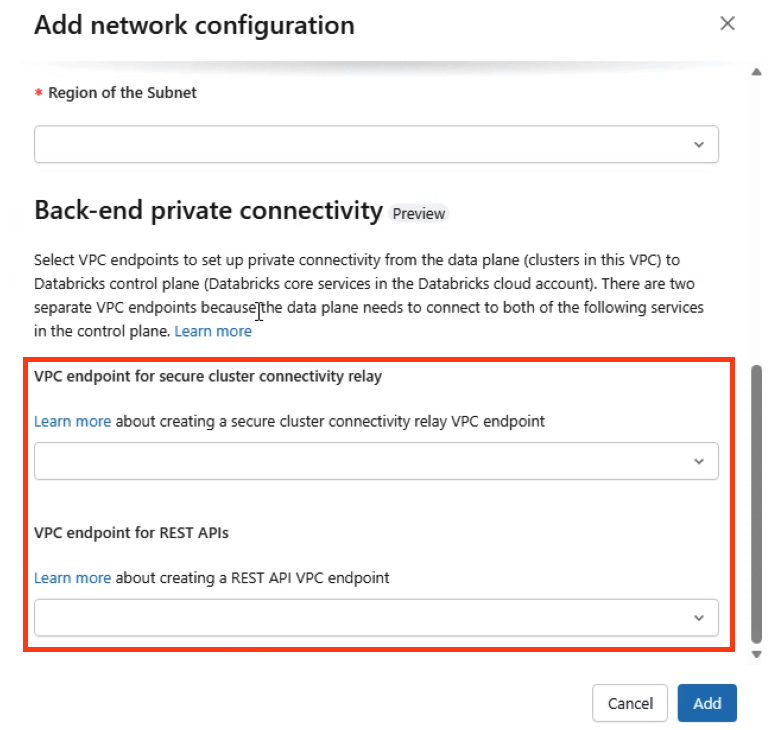
Create Private Access Settings:
Create the Workspace (Workspace Creation):
Workspace Validation (official docs: Step 7):
After creation, the workspace should show as RUNNING.
Before starting clusters, complete the DNS configuration described in the next step.
This ensures the workspace is running with full PSC back-end connectivity and clusters connect through private endpoints only.
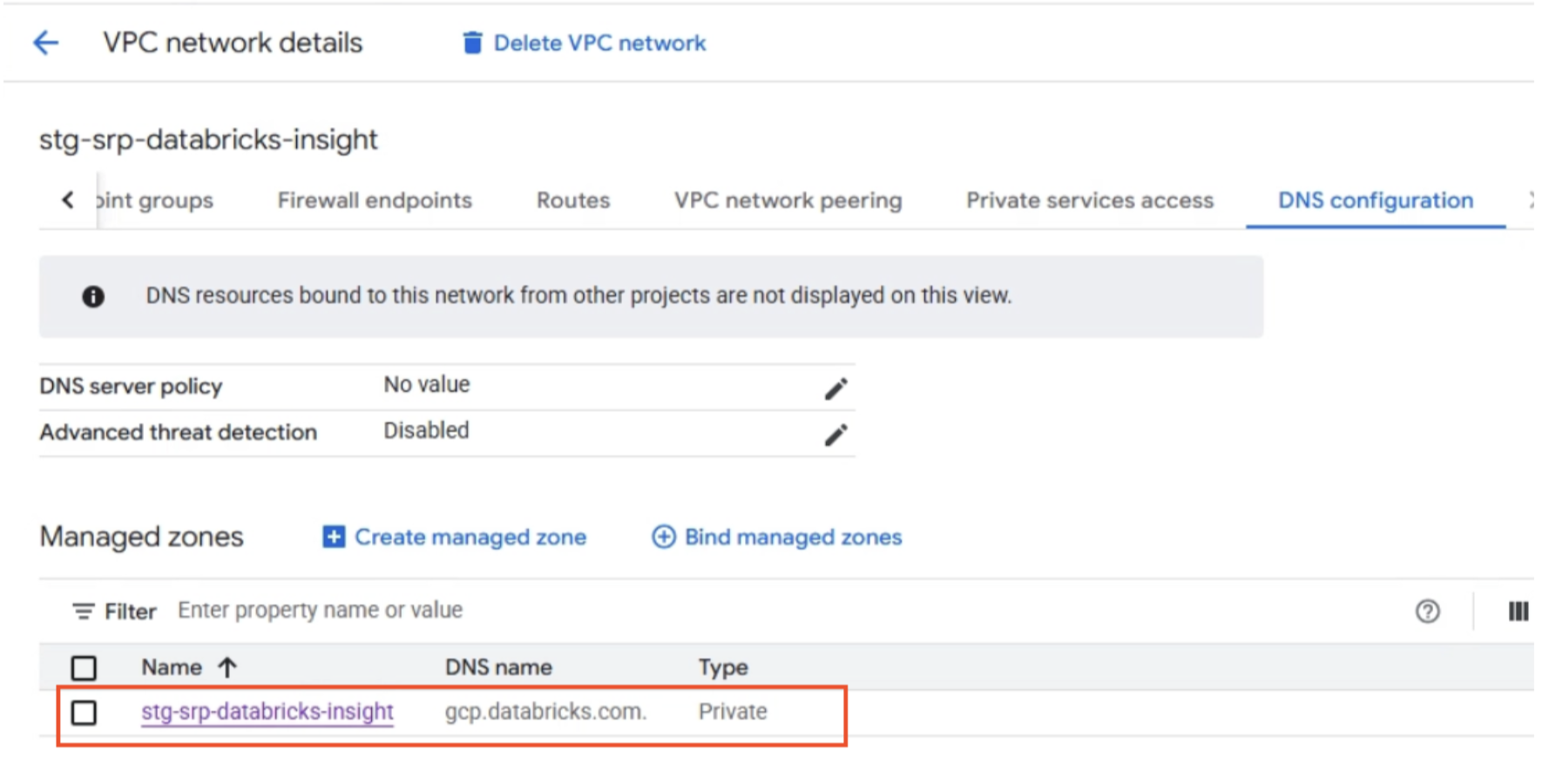
Databricks does not create DNS records. It only publishes the Private Service Connect service attachments. DNS configuration is entirely the customer's responsibility.
A PSC-enabled deployment requires three DNS components inside the workspace VPC:
Private Zone: gcp.databricks.com
This zone handles workspace and SCC resolution. Create A records that map Databricks hostnames to the appropriate PSC endpoint IPs.
| DNS Record | Points To | Purpose |
|---|---|---|
<workspace-id>.<n>.gcp.databricks.com | REST API PSC endpoint IP | Workspace URL resolution |
dp-<workspace-id>.<n>.gcp.databricks.com | REST API PSC endpoint IP | Data plane connectivity |
<region>.psc-auth.gcp.databricks.com | REST API PSC endpoint IP | Browser authentication |
tunnel.<region>.gcp.databricks.com | SCC relay PSC endpoint IP | Secure cluster connectivity |
Private Zone: googleapis.com
When a Databricks cluster runs operations that depend on Google-managed APIs — such as reading from or writing to Cloud Storage, or interacting with BigQuery — those API calls need to resolve to private IPs rather than public Google endpoints. Without this zone, API traffic from cluster VMs would attempt to route over the public internet, which a deny-by-default egress firewall will block.
Creating a private zone for googleapis.com and binding it to the compute plane VPC overrides public DNS resolution for Google API hostnames.
This ensures services like storage.googleapis.com resolve to private IPs reachable within the VPC, keeping API traffic on private routing paths through PSC rather than exiting to the public internet.
Refer to: Access Google APIs through endpoints
Service Directory Zone: p.googleapis.com
When PSC for Google APIs is enabled, GCP automatically creates a Service Directory namespace (under p.googleapis.com).
This namespace is how GCP internally tracks and resolves the private endpoints backing Google APIs in your VPC — it is the mechanism that makes the googleapis.com private zone work under the hood.
This zone is fully managed by GCP and should not be modified or deleted.
Validation
Before launching any clusters, verify DNS resolution from a VM inside the VPC:
nslookup <workspace-id>.<n>.gcp.databricks.com
nslookup tunnel.<region>.gcp.databricks.com
nslookup <region>.psc-auth.gcp.databricks.com
Each hostname must resolve to its corresponding private PSC endpoint IP. If any record resolves publicly or fails, fix DNS before proceeding (official docs: Step 8).
One of the more operationally valuable aspects of this architecture is that the GCP-side PSC endpoints do not need to be reprovisioned for each new Databricks workspace. As long as additional workspaces are created in the same region and VPC, they can share the same two endpoints — the SCC relay endpoint and the REST API endpoint.
A note on quotas: Up to 10 PSC endpoints per region per VPC host project are supported. Multiple workspaces in the same region and VPC share the same endpoints; new ones do not need to be provisioned for each workspace. Since each workspace only requires two endpoints, sharing them across workspaces keeps you well within quota while reducing the operational overhead of managing additional GCP resources.
What Gets Reused vs. What Gets Created Per Workspace
| Resource | Reused | Per Workspace |
|---|---|---|
| PSC endpoints (SCC relay + REST API) | ✓ | |
| GCP subnets (compute + PSC endpoint) | ✓ | |
| Cloud Router, Cloud NAT, Cloud VPN | ✓ | |
| Registered VPC endpoints in Databricks | ✓ | |
| Private Access Settings object | ✓ (same region) | |
| Network Configuration object | ✓ | |
| Workspace | ✓ | |
| DNS A records | ✓ |
A note on DNS zone scope: Since the
gcp.databricks.comprivate zone is already bound to the compute plane VPC, new workspace DNS records are simply added to the existing zone. There is no need to create a new zone or rebind it to the VPC. The existinggoogleapis.comandp.googleapis.comzones also carry over automatically — no changes needed there.
Missing or misconfigured private DNS — the most common PSC-related failure pattern.
When a cluster starts, the driver node resolves the control-plane hostname (for example, <workspace-id>.<n>.gcp.databricks.com) to determine where to send REST API traffic.
In a standard deployment, this resolves to a public Databricks IP.
In a PSC deployment, the private Cloud DNS zone overrides public resolution and returns the private PSC endpoint IP.
If the private DNS configuration is missing or incomplete:
The resolution is straightforward: verify that the private DNS zone is attached to the correct VPC and that all required A records are present.
The nslookup validation step prevents this issue from reaching production.
Using auto-assigned instead of static IPs for PSC endpoints.
Auto-assigned IPs can change. If an IP shifts after DNS records are written, all cluster connectivity silently breaks. When creating each endpoint, at the Select an IP Address step, click the IP address drop-down and select Create IP Address. In the dialog, select Let me choose and enter a specific IP rather than using Assign automatically. This ensures an IP is explicitly reserved and tied to a named address source that you control. Always do this for both REST API and SCC relay endpoints.
Configuring PSC on an existing workspace.
PSC must be set at workspace creation time. There is no migration path from a public-routed workspace to a PSC-enabled one. This is a hard constraint in the Databricks platform.
Missing firewall rule for PSC endpoint subnet.
Endpoints can appear healthy in the GCP Console while traffic is actually being dropped at the firewall. If clusters fail after DNS validates correctly, a missing egress rule to the PSC endpoint subnet is the first thing to check.
Deploying a Databricks workspace with PSC on GCP introduces additional complexity compared to a standard deployment, but the benefits in terms of network isolation and security posture are significant. By routing control plane communication through private endpoints instead of public service paths, organizations can keep sensitive workloads entirely within Google's private backbone while maintaining the operational flexibility of Databricks.
The goal of this post was to bridge the gap between the official documentation and a working production implementation — covering not just what to configure, but in what order, why certain decisions are permanent, and where things quietly break. The architecture described here — customer-managed VPC, dual PSC endpoints, private DNS, deny-by-default firewall, and hybrid connectivity over Cloud VPN — reflects a pattern that satisfies both the technical requirements of Databricks PSC and the security requirements of organizations operating in regulated environments.
The Databricks back-end PSC guide and the firewall configuration reference are the right starting points. This post is meant to complement those with the sequencing, implementation details, and failure patterns that only surface when you go through the process end to end.
Read more about the latest and greatest work Rearc has been up to.
A step-by-step guide to deploying a Databricks workspace with Private Service Connect (PSC) on GCP and common pitfalls to avoid.

A deep dive into Databricks Foreign Catalogs for Glue Iceberg table access

Learn how we built Rearc-Cast, an automated system that creates podcasts, generates social summaries, and recommends relevant content.

Overview of the Talent Pipeline Analysis Rippling app
Tell us more about your custom needs.
We’ll get back to you, really fast
We will evaluate your query and respond within 2 business days.
Kick-off meeting
We will schedule a quick meeting to further understand your use case and start working toward a solution together!